Ninth post in a series on building business process automation at scale. Infrastructure. Automation. Where automation fails. Statistical validation. When models disagree. What to do about it. A working system. Framework vs. architecture. This time: turning a pipeline into a tool any LLM can call.
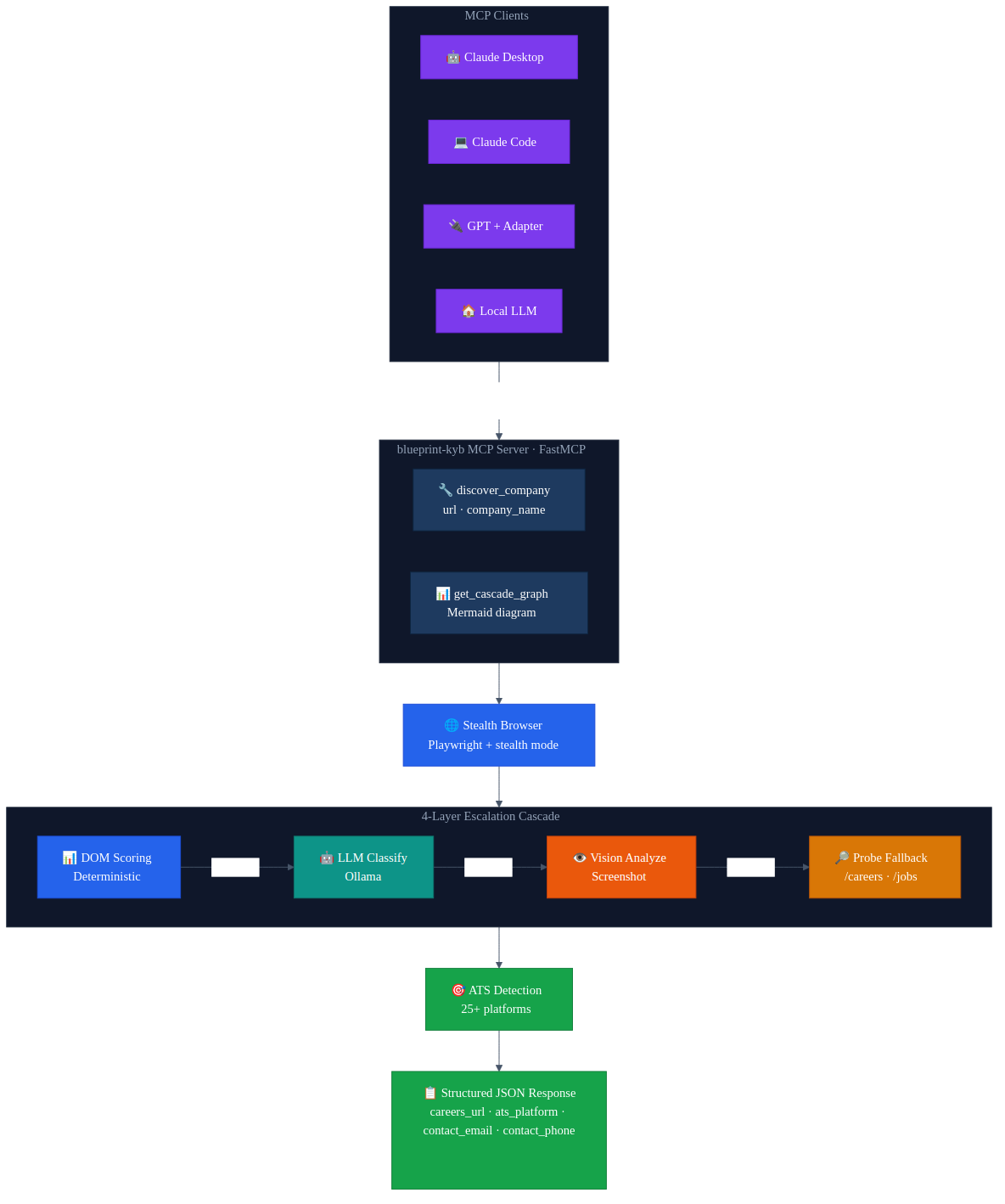
The short version: Blueprint's KYB verification cascade — stealth browsers, 4-layer escalation, 25+ ATS platform detection — now runs as an MCP server. Give it a company URL, get back structured data. The wrapper is 160 lines. Any LLM that speaks MCP can call it. If you've built a pipeline that does something useful, wrap it as an MCP server. It's less work than you think.
The Problem I Actually Had
I built a company verification cascade that works well. It navigates to a company website, finds the careers page, identifies which ATS platform they use, pulls contact info. It's processed thousands of companies. The architecture is solid.
And it was completely locked inside my application.
I'd be working in Claude Code on something unrelated and think "does this company use Greenhouse or Lever?" and the answer was sitting in a pipeline I couldn't reach without switching to the Blueprint codebase, firing up Docker, and running a batch job. All that infrastructure, all that logic, and I couldn't just ask for it.
That's the problem with most pipelines right now. You build something capable and it lives in one place. Anything else that wants to use it needs custom integration code — REST endpoints, API keys, client libraries, documentation. Every consumer rewrites the glue.
Why MCP
If you're reading this you probably already know what MCP is. Anthropic's protocol for connecting LLMs to external tools. Servers expose tools, clients discover and call them. Typed schemas, standard interface, pluggable transport.
The part that matters for this story: MCP turns a function into something any LLM can call. Not "any LLM that has my API key and knows my endpoint format." Any LLM that speaks the protocol. Claude, GPT with an adapter, a local model — doesn't matter. The tool shows up with its schema, the LLM reads the description, and it can call it.
I'd been putting off the MCP wrapper for weeks. I assumed it would be a yak-shave — protocol negotiation, schema generation, transport layers, some JSON-RPC thing I'd have to debug. I finally sat down one evening to scope it out. I was done before midnight.
The Actual Implementation
The whole server is 160 lines. Most of that is the docstring.
Setup:
from mcp.server.fastmcp import FastMCP

mcp = FastMCP("blueprint-kyb")

if __name__ == "__main__":
    mcp.run()
FastMCP handles everything — protocol negotiation, tool registration, transport. That's it for the boilerplate.
The main tool:
@mcp.tool()
async def discover_company(
    url: str,
    company_name: str = "",
    use_langgraph: bool = True,
) -> dict[str, Any]:
    """Run the KYB discovery cascade on a company website.

    Navigates to the URL with a stealth browser, then runs a 4-layer
    escalation cascade to find careers pages and identify ATS platforms:

    1. Deterministic DOM scoring (semantic element analysis)
    2. LLM text classification (Ollama/Llama 3, if available)
    3. Vision model analysis (screenshot + badge annotation, if available)
    4. Probe fallback (/careers, /jobs, subdomain probing)

    Returns:
        Dictionary with careers and contact signals:
        {
            "url": "https://example.com",
            "careers": {
                "careers_url": "https://example.com/careers",
                "ats_platform": "greenhouse",
                "ats_url": "https://boards.greenhouse.io/example"
            },
            "contact": {
                "contact_email": "info@example.com",
                "contact_phone": "+1-555-0100",
                "contact_page_url": "https://example.com/contact"
            }
        }
    """
That docstring matters. MCP sends it to the client as the tool description. The LLM reads it to understand what the tool does and when to use it. I spent more time writing the docstring than the actual code — because the docstring is the interface for an LLM consumer. FastMCP derives the JSON Schema from the type annotations automatically. url: str becomes a required string. company_name: str = "" becomes optional.
The implementation just delegates to the existing cascade:
async def _discover_langgraph(url: str, company_name: str) -> dict[str, Any]:
    from verifier.graph.build import discover_one_langgraph

    async with async_playwright() as p:
        browser = await p.chromium.launch(headless=True)
        context = await browser.new_context(ignore_https_errors=True)
        await _stealth.apply_stealth_async(context)
        page = await context.new_page()
        try:
            return await discover_one_langgraph(
                page, url,
                company_name=company_name,
                ollama_base_url=_OLLAMA_BASE_URL,
                ollama_model=_OLLAMA_MODEL,
                ollama_vision_model=_OLLAMA_VISION_MODEL,
            )
        finally:
            await page.close()
            await context.close()
            await browser.close()
The MCP layer doesn't know about DOM scoring or ATS regex patterns or vision models. It launches a browser, calls the existing function, cleans up, returns the result. All the complexity stays where it was.
I also added a second tool — get_cascade_graph — that returns the LangGraph flow as a Mermaid diagram. No parameters, just returns a string. Mostly useful for debugging, but it turns out LLMs like having a way to inspect the tool they're about to call.
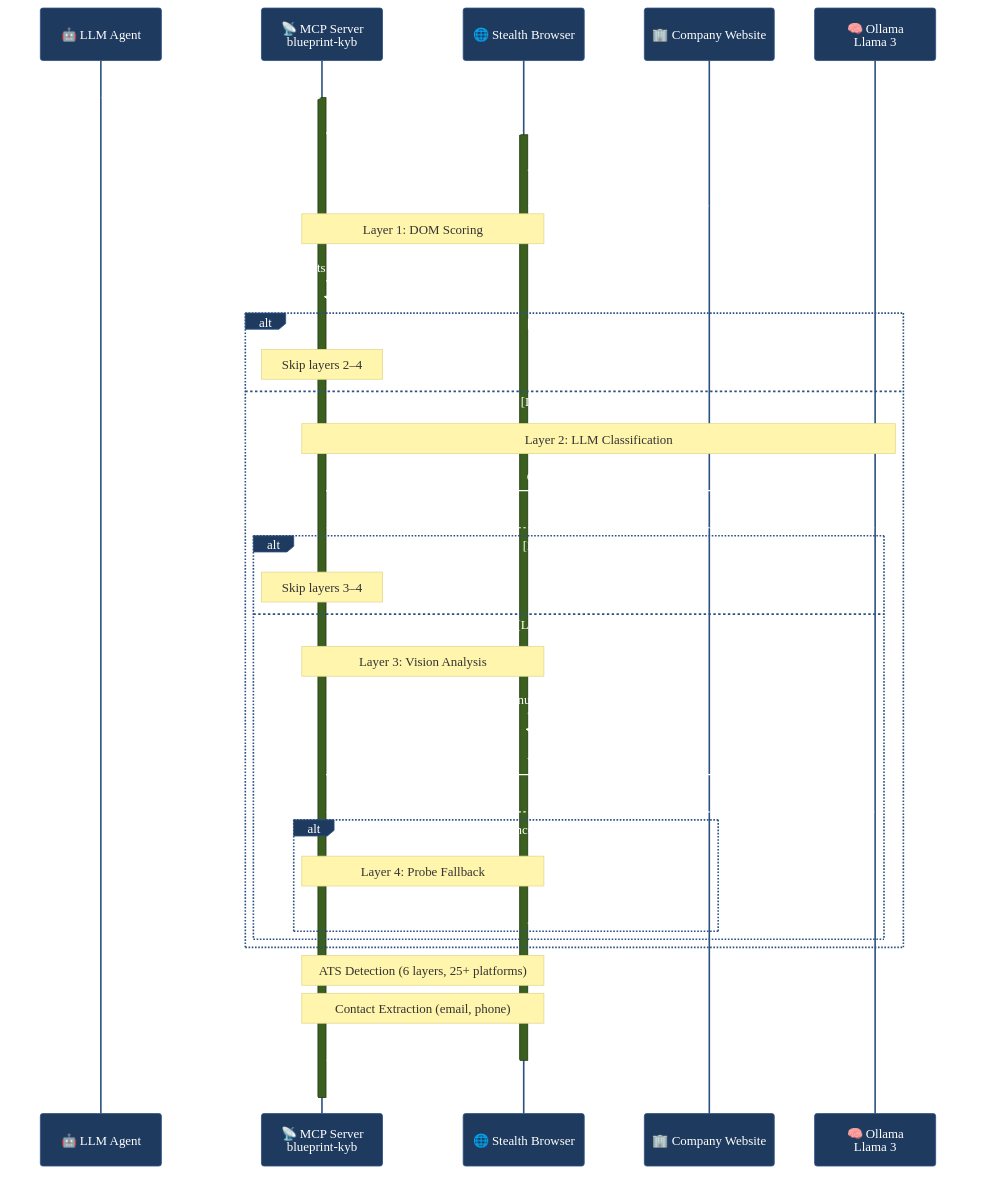
Here's what a full discover_company call looks like end-to-end:
What Tripped Me Up
My first version launched a new browser for every tool call and never closed it. I was testing in Claude Code, calling discover_company three times in a row, and watched my memory climb to 4GB before I realized I had three headless Chromium instances sitting around. The finally block in the code above is there because of that evening.
The other thing: my first docstring was too terse. Just "Run discovery on a company URL." The LLM had no idea when to use it. It would try to use it for things like "look up this company's stock price." I rewrote the docstring to be specific about what the tool actually does — careers pages, ATS platforms, contact info — and the LLM stopped misusing it. The docstring is the UX for your tool. Treat it that way.
Using It
Add a server entry to your MCP client config:
{
    "mcpServers": {
        "blueprint-kyb": {
            "command": "uv",
            "args": ["run", "python", "-m", "verifier.mcp_server"],
            "cwd": "/path/to/blueprint"
        }
    }
}
The client launches the server as a subprocess, discovers the tools, and they're available. From that point you can be in any conversation and ask "what ATS platform does this company use?" and the LLM calls discover_company, launches a stealth browser, runs the cascade, and comes back with structured data. It doesn't know or care about the 9-node LangGraph graph running behind the call. It gets a JSON response with the fields it needs.
That's the thing that actually surprised me. Not that MCP works — I expected it to work. But that the experience of using the tool from the LLM side is so natural. You stop thinking about it as "calling a pipeline" and start thinking about it as the LLM just knowing how to check companies. The protocol disappears.
The Bigger Point
Most MCP servers right now wrap simple things — database queries, file operations, web searches. But there's nothing stopping you from wrapping a complex pipeline. Blueprint's MCP server has a 9-node LangGraph graph, stealth browser automation, multi-model cascading, pgvector entity matching, and ATS detection across 25+ platforms behind a single tool call with two parameters.
The consumer sees: give it a URL, get back structured data. That's it.
This is the same idea that made Unix composable. grep doesn't know what sort does. They communicate through a standard interface and you build pipelines from them. MCP is that standard interface for LLMs. Your pipeline's output becomes another agent's input. You don't have to anticipate who'll use it or how — you just expose the capability and let people compose it into workflows you never imagined.
The MCP server is 160 lines. The cascade it wraps is thousands. The ratio tells you something: the hard part was never the interface. It was building the thing worth exposing. If you've already done that — if you've got a pipeline that does something useful — the MCP wrapper is an evening's work. Maybe less if you don't leak browser instances.
The full source — MCP server, LangGraph cascade, and original async implementation — is on GitHub: avatar296/blueprint.
Have questions about this topic?
We love talking tech. Reach out and let's discuss how this applies to your business.